Smart lighting can make a room feel calmer, brighter, or easier to use without requiring a wall switch every time. Yet the technology is not magic. A bulb, switch, wireless connection, and control app each play a role, and a weak link can make the whole setup feel unreliable. The details matter.
Understanding how smart lighting systems work in indoor environments begins with a simple path: a command travels from an app, voice assistant, sensor, or schedule to the light. Depending on the product, that signal may pass through a home hub or connect directly over Wi-Fi, Bluetooth, or another wireless protocol. The light then responds by turning on, dimming, or changing color temperature. Some systems also use motion and daylight sensors. A hallway light, for example, might brighten when someone walks past, then fade after the space is empty. That matters.
The seven tips ahead explain the parts, connections, controls, and common setup choices behind these systems. They also cover practical checks, such as confirming bulb and switch compatibility before buying. Not always. A feature advertised as automatic may still need careful placement or adjustment to work well. A sensor behind a curtain can miss movement; a bright lamp near a window may respond poorly to changing daylight. Privacy and network security deserve attention, too. Start small. One room can reveal what works in your home before you add more devices. Smart lighting offers real convenience, but thoughtful setup—not the label on the box—usually determines whether it feels dependable.
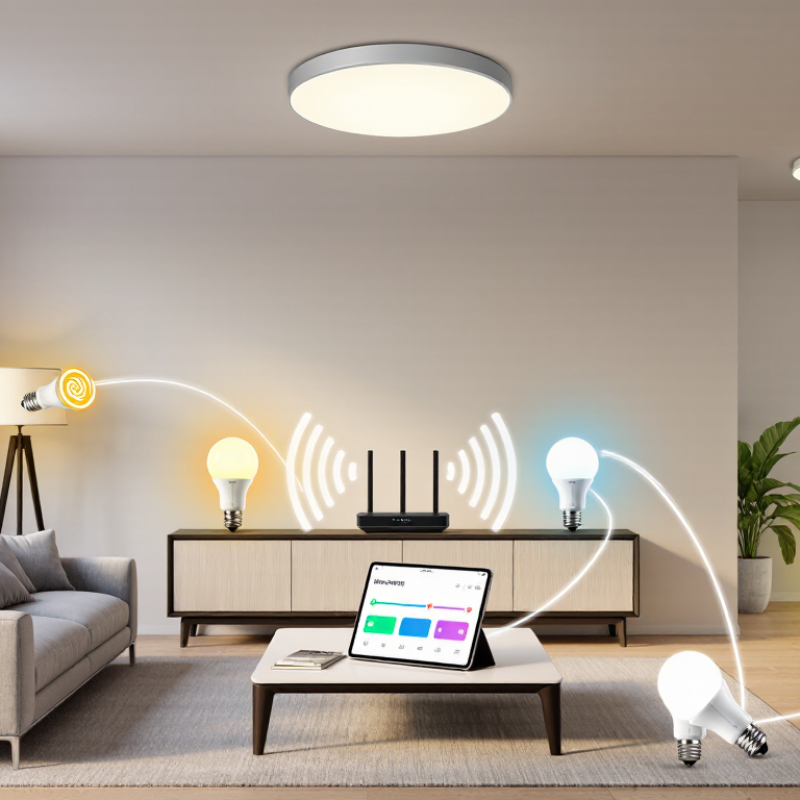
An indoor smart-lighting system pairs a lamp with controls and a way to communicate. Inside many LED lamps, a driver regulates electrical power, while a receiver accepts dimming or color commands. The lamp sets the limits: a warm-white bulb cannot create saturated blue light. Small detail. Poor dimmer compatibility may cause flicker, buzzing, or a narrow usable brightness range.
Controls include wall switches, phone apps, motion sensors, and schedules. A sensor near a hallway can turn on a low light after dusk, while a bedside button still works when a phone is across the room. Schedules can adjust brightness at set times, but they need the correct clock and settings. Sensor placement matters, too; a sensor facing a sunny window may respond differently throughout the day. That can be annoying.
Connectivity carries commands between lamps, controls, and sometimes a hub. Some systems use Wi-Fi or Bluetooth; others use low-power mesh networks, where nearby devices relay signals. A hub can coordinate different devices, though it adds another piece to install and maintain. Internet access may be needed for remote app control, but some systems support local controls when the connection fails. Check this before choosing components. Compatibility is not always obvious, and a setup that looks simple on a screen can take patience in a real room.
Indoor smart lights need a reliable path between each bulb and the control app. Some connect directly to Wi-Fi, while others use a hub that bridges low-power wireless protocols, such as Zigbee or Thread, to your home network. A hub can reduce Wi-Fi traffic and help devices communicate across rooms. Direct Wi-Fi control may be simpler, but each light depends on the router’s coverage and capacity. Walls matter. A signal that reaches the kitchen may weaken near a closed bedroom door.
Tips: Check protocol compatibility before buying. Place the hub in an open, central spot. Keep it away from metal cabinets. Test Wi-Fi strength where each light will sit. Use the same network settings during setup. Update device software when prompted. Keep a manual switch accessible. Small details count.
When a command travels through a hub, the app sends it over the network, and the hub relays it wirelessly to the light. With direct Wi-Fi bulbs, the router carries that command itself. If a light responds slowly, check its signal and the hub’s location before resetting everything. I have found that setup guides can make range sound more predictable than it is; real walls and interference vary. A simple test at the intended lamp location often tells you more.
| Tip | How the Connection Works | What to Check Indoors | Practical Benefit |
|---|---|---|---|
| 1. Identify the system’s communication path | A control device sends a command directly over Wi-Fi or Bluetooth, or communicates through a hub that relays commands to lights using a separate wireless protocol. | Check whether the lights connect directly to the home router or require a compatible hub. | Knowing the path helps explain which devices must be powered on and connected for control to work. |
| 2. Understand what a hub does | A hub bridges a local lighting network, such as Zigbee or Thread, with the home network and, in some setups, an internet service. | Place the hub in an open, central area and follow its setup instructions. A hub may need an Ethernet or Wi-Fi connection, depending on its design. | Many low-power lights can communicate with one coordinator instead of each light connecting directly to the router. |
| 3. Choose the right wireless protocol | Wi-Fi connects devices to a wireless network; Zigbee and Thread are low-power mesh networking protocols; Bluetooth is commonly used for nearby setup or control, and Bluetooth Mesh can relay messages among devices. | Confirm that the controller, hub, and lights support the same protocol or a compatible bridge. Protocols are not automatically interchangeable. | Protocol compatibility determines how devices pair, communicate, and fit into the rest of the home system. |
| 4. Consider mesh coverage and layout | In a mesh network, compatible, powered devices can relay messages for other devices. Many Wi-Fi and Bluetooth devices do not act as mesh relays unless designed to do so. | Thick walls, metal surfaces, appliances, and long distances can weaken radio signals. Test lights in their final locations. | Good placement can reduce delayed responses and disconnected lights without assuming a single fixed indoor range. |
| 5. Check Wi-Fi requirements | Wi-Fi lights communicate with the router directly. Some products support only the 2.4 GHz band, while others support additional bands; requirements vary by device. | Read the device specifications and make sure the router’s settings and coverage meet them. Avoid assuming every smart light works on every Wi-Fi band. | Matching the device to the network can prevent pairing problems and unreliable connections. |
| 6. Plan for internet and local control | Some functions run locally over the home network, while remote access, voice services, or cloud-dependent features may require an internet connection. | Check which features remain available if the internet is down, and whether the hub or controller must stay powered. | Understanding local versus cloud control helps set realistic expectations for automations and remote access. |
| 7. Secure and maintain the system | Connected lights and hubs exchange commands over wireless networks. Firmware updates can provide fixes and security improvements. | Use a strong, unique router password, enable available security settings, update device firmware, and remove devices you no longer use. | Basic network maintenance supports safer, more dependable indoor lighting control. |
Indoors, smart lighting changes when a sensor detects movement, daylight, or a user command. A ceiling-mounted occupancy sensor may notice someone entering a hallway, then switch on nearby lights. A daylight sensor can dim them when sunshine reaches the desk. The U.S. Department of Energy explains that occupancy sensors turn lights off in empty spaces, while daylight controls adjust electric lighting to available natural light. The response depends on placement and settings. A sensor hidden behind a shelf may miss movement. Small detail, big effect.
User commands add another layer. A wall control, phone app, or voice command can change brightness, color temperature, or schedules; the system then sends instructions to compatible lights. Some setups also use scenes, such as softer light for evening reading. The International Energy Agency reports that lighting uses about 15% of global electricity, which helps explain the interest in controls that prevent needless operation. Still, automation is not automatically efficient: a poorly chosen schedule can leave lights on in an empty room. Test the sensor from the doorway, adjust its timeout, and check the result at different times of day. It can feel fussy. But the room’s real use matters more than the default settings.
Indoor smart lighting uses sensors, schedules, and control settings to change brightness as a room’s use shifts. A motion sensor can brighten a hallway when someone enters, then dim it after the space is empty. Daylight sensors can lower lamp output near a sunny window. Small adjustments matter. The U.S. Department of Energy’s residential lighting guidance estimates lighting uses about 15% of an average home’s electricity. Dimming lights when full output is unnecessary can therefore help reduce energy use, though actual savings depend on the home and its routines.
Color and timing are adjustable, too. A system might provide cooler, brighter light for a kitchen task, then warmer, softer light in the evening. Schedules can coordinate these changes, while occupancy sensors respond to people moving through a room. In practice, settings need tuning: a sensor may mistake a still reader for an empty room, or a fixed schedule may not fit a late night. That part is easy to overlook. Review the response at the actual desk, doorway, or bedside, not just in an app. Automation works best when its changes feel natural and remain easy to override.
Smart lighting works well when its settings fit real routines. Start by grouping ceiling lights, desk lamps, and hallway lights by room or task. Set a warm, lower level for evening reading and a brighter setting for cooking or cleaning. Use schedules only where they help; a fixed bedtime routine may not suit changing work hours. Keep manual switches accessible. The setup should still be usable when an app or network is unavailable.
Tip: Test one room before configuring the whole home. Adjust brightness at the desk, sofa, and doorway, since the same setting can feel different in each spot. A motion sensor may help in a corridor, but position it to avoid triggering from passing movement outside the room. Small changes matter.
Tip: Review schedules and sensor settings every few weeks. Dust lamp covers and sensors with a dry, soft cloth, and check that bulbs remain firmly fitted. If lights flicker or disconnect, note when it happens and inspect the connection before changing several settings at once. Not every adjustment works perfectly on the first try. I have found that a simple, consistent scene is often more useful than a long list of clever presets. Keep a brief note of settings that work, then revisit them as seasons and routines change.
A hallway sensor can brighten lights when someone enters, then dim them after the space is empty. It may miss someone sitting still.
Yes. They can lower lamp output near a sunny window when full brightness is unnecessary. Actual energy savings vary by home.
Use brighter, cooler light for kitchen tasks and warmer, softer light for evening reading. The best setting can feel different in each room.
They can help with regular routines, such as an evening scene. Changing work hours may make a fixed bedtime schedule inconvenient.
Test one room first. Adjust the brightness at the desk, sofa, and doorway before setting up other rooms.
A corridor can be a practical spot. Aim the sensor away from passing movement outside the room to reduce unwanted triggers.
Keep manual switches accessible and easy to use. Simple controls matter.
Dust lamp covers and sensors with a dry, soft cloth, and check that bulbs are firmly fitted. If lights flicker, note when it happens before changing several settings at once. Not every fix works immediately.
Check them every few weeks, then revisit as seasons and routines change. A brief note about settings that work can help, though I sometimes forget to keep one.
Smart indoor lighting brings together lamps, controls, and connectivity to make everyday illumination easier to manage. Understanding how smart lighting systems work in indoor environments starts with the way lights communicate: they may connect through a central hub, a home Wi-Fi network, or other wireless protocols. Once connected, users can adjust lights through controls, while sensors can respond to movement or changes in ambient light and trigger lighting automatically.
Automation allows an indoor lighting system to change brightness, color, and timing to suit different activities and routines. For example, lights can be scheduled to turn on at certain times or adjusted to create a comfortable setting for reading or relaxing. To keep the system efficient, configure schedules and sensor settings to match your needs, check that connections remain stable, and review the setup as routines change. These simple steps help make smart lighting practical, responsive, and easier to maintain.

Velvet Light